Monitoring
A seller keeps its own health record: which services pass their health checks, the gas balance it pays settlement from, and what it has served. There are three ways to watch it, and none needs a service run by anyone else.
antseed seller dashboard: a local web page for one seller.- The gateway console: a Seller page when the gateway host also runs a seller.
- Alerts: the seller messages you when something needs a look.
For time series and your own monitoring stack, scrape Metrics with Prometheus.
Seller dashboard
antseed seller start serves the dashboard on 127.0.0.1:3120 (another free port if that one is taken; set one with --dashboard-port). In a terminal it prints the link. The link carries a session token, so a seller running as a service only logs the address. To get the link, or to open the dashboard for a seller that is not running:
antseed --data-dir ~/.antseed seller dashboard
It opens the running seller's dashboard, or serves one itself until you press Ctrl+C. On a remote server, tunnel the port with ssh -L 3120:127.0.0.1:3120 <server> and open the link locally. Start the seller with --no-dashboard to turn it off.
The dashboard has:
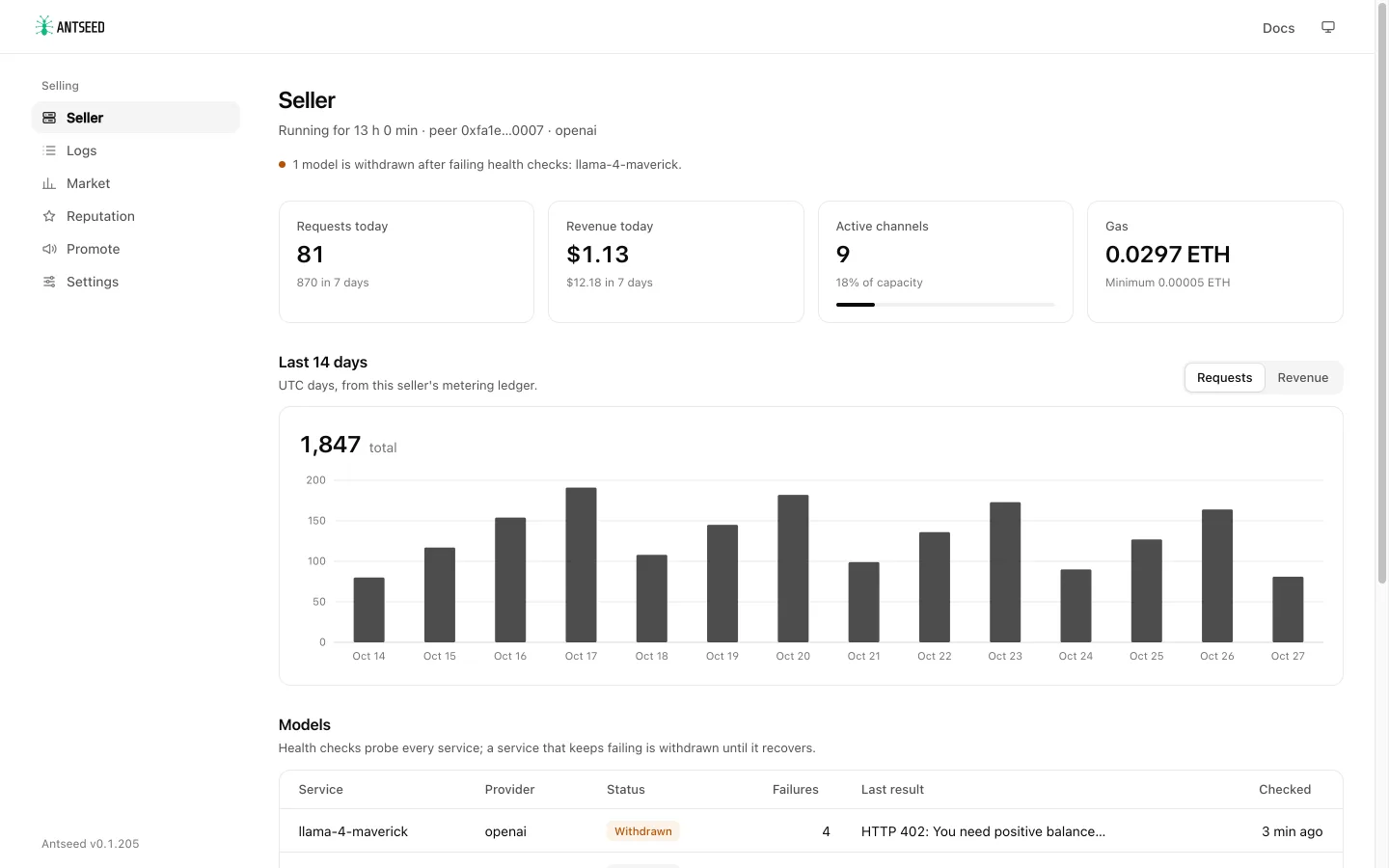
- Status: running or stopped, uptime, peer id and provider.
- Today: requests, revenue, active channels and the gas balance.
- Last 14 days: requests or revenue per UTC day, from the seller's metering ledger.
- Models: every service with its health-check status. A service that keeps failing is Withdrawn (no longer advertised) until a check passes again. The last result shows the upstream error, for example
HTTP 402when the upstream account is out of credit. - Recent events: starts and stops, services withdrawn or restored, gas running out or refilled, quiet periods.
- Payments: settled and delivered USDC and channel counts from the local channel ledger.
- Market, Reputation, Promote and Settings pages: see below.
It listens on 127.0.0.1:3120 by default (--port, --host). The URL it prints carries a session token: anyone with the URL can see the seller's earnings and change its alerts and settings, so treat it like a password.
On a remote server, keep the default host and tunnel the port:
ssh -L 3120:127.0.0.1:3120 <server>
Then open the printed URL on your own machine.
Logs
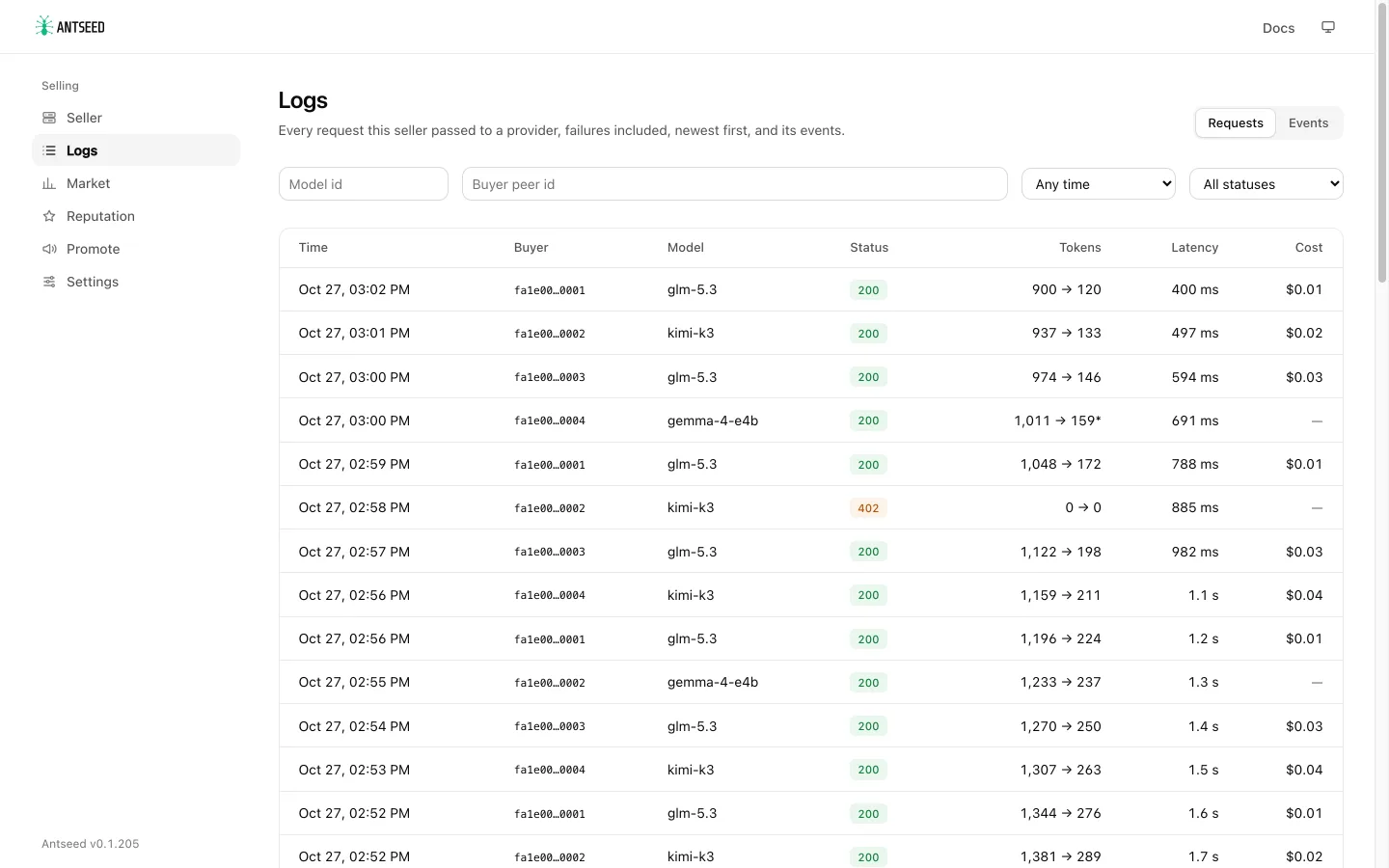
Logs lists every request the seller passed to an upstream, failures included, newest first: time, buyer, model, status, input and output tokens, latency and cost (from the signed usage receipt). Filter by model (its exact id), buyer, time range or failed requests only; older pages load on demand without slowing down on a large metering database. A filtered page looks through at most 5,000 requests at a time; when it finds fewer matches, Look further back (or --cursor in the CLI) continues. Requests the seller refuses itself (payment required, free-tier limit, a refused country) are not in the log. Tokens marked * were estimated from the body size because the upstream reported no usage. The model is recorded from this release on; older requests show the provider instead. Events on the same page is the seller's event journal.
Market
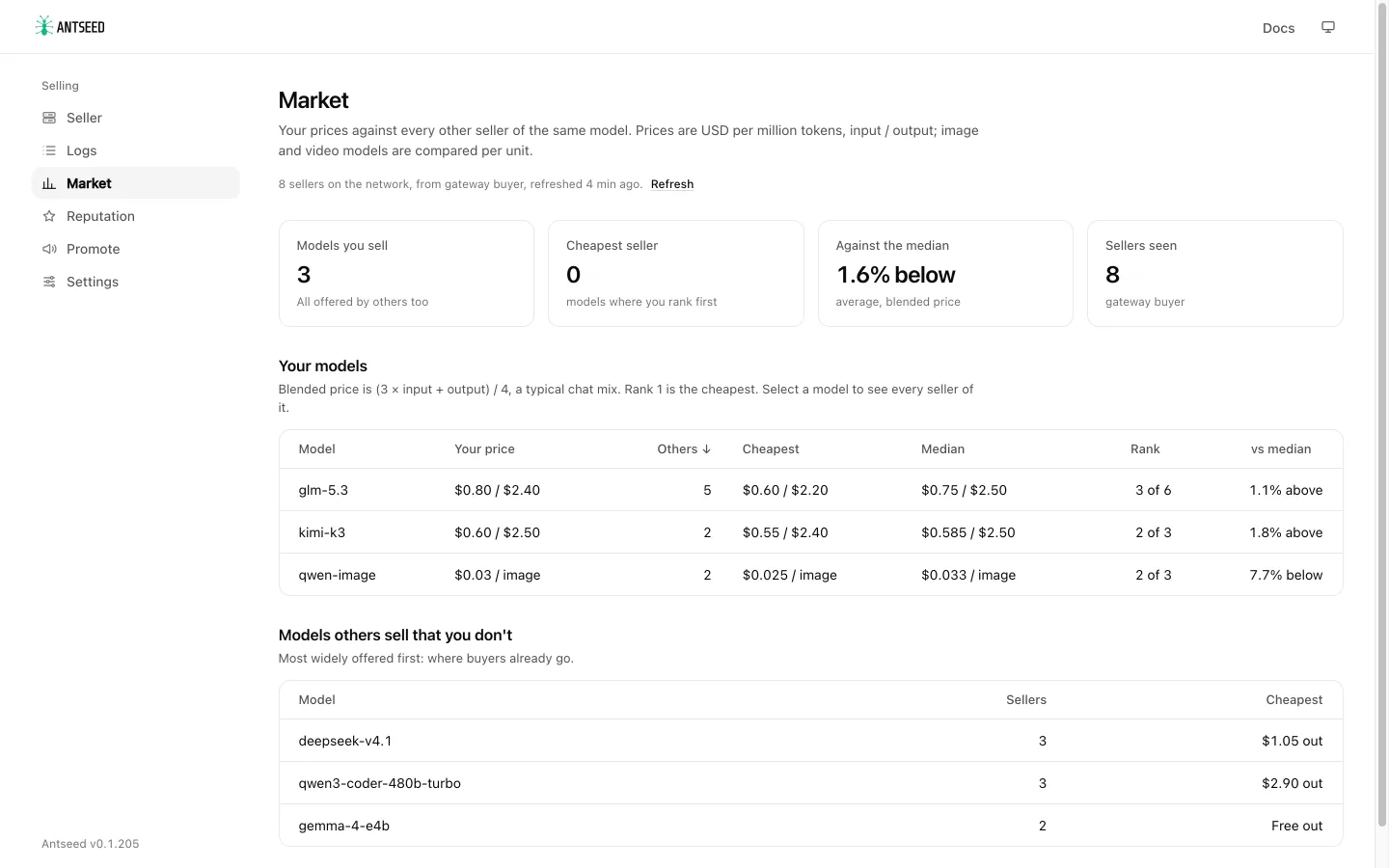
Market compares each model you sell with every other seller of the same model: how many others offer it, the cheapest and median prices, your rank by blended price (three parts input to one part output, a typical chat mix) and how far you are from the median. An image or video model billed per unit is compared per unit instead (say per image), only with sellers that price it in the same unit. Select a model to see every seller of it with price, trust score, TEE and load, your own row marked. Edit your price opens that model in Settings. Models only you offer are marked, and a list shows the models other sellers offer that you don't, most widely offered first.
Reputation
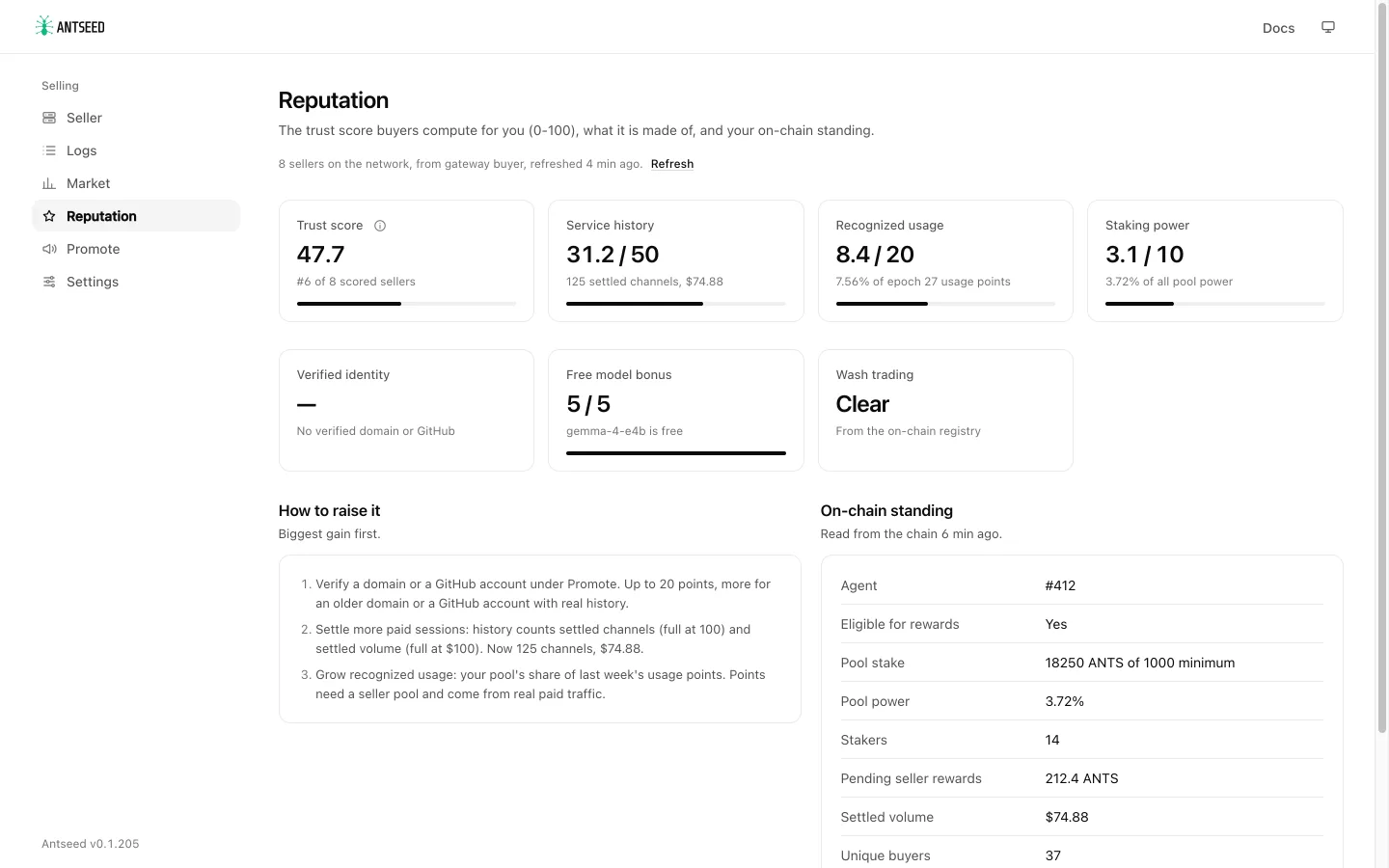
Reputation shows the trust score buyers compute for your seller (0-100) part by part: service history (up to 50), recognized usage (20), staking power (10), verified identity (20), the free model bonus (+5) and the wash-trading check. Each part has a plain next step for raising it, biggest gain first. Next to it is your on-chain standing: agent id and binding, eligibility, pool stake against the minimum, pool power and stakers, pending seller rewards, and settled volume, buyers, requests and ghost rate when the explorer answers.
Promote
Promote has your profile link on the explorer, a seller card with your name, trust score and prices (download it as SVG or PNG), and pinned model ids (<peerId>@<model>) that send buyers straight to you.
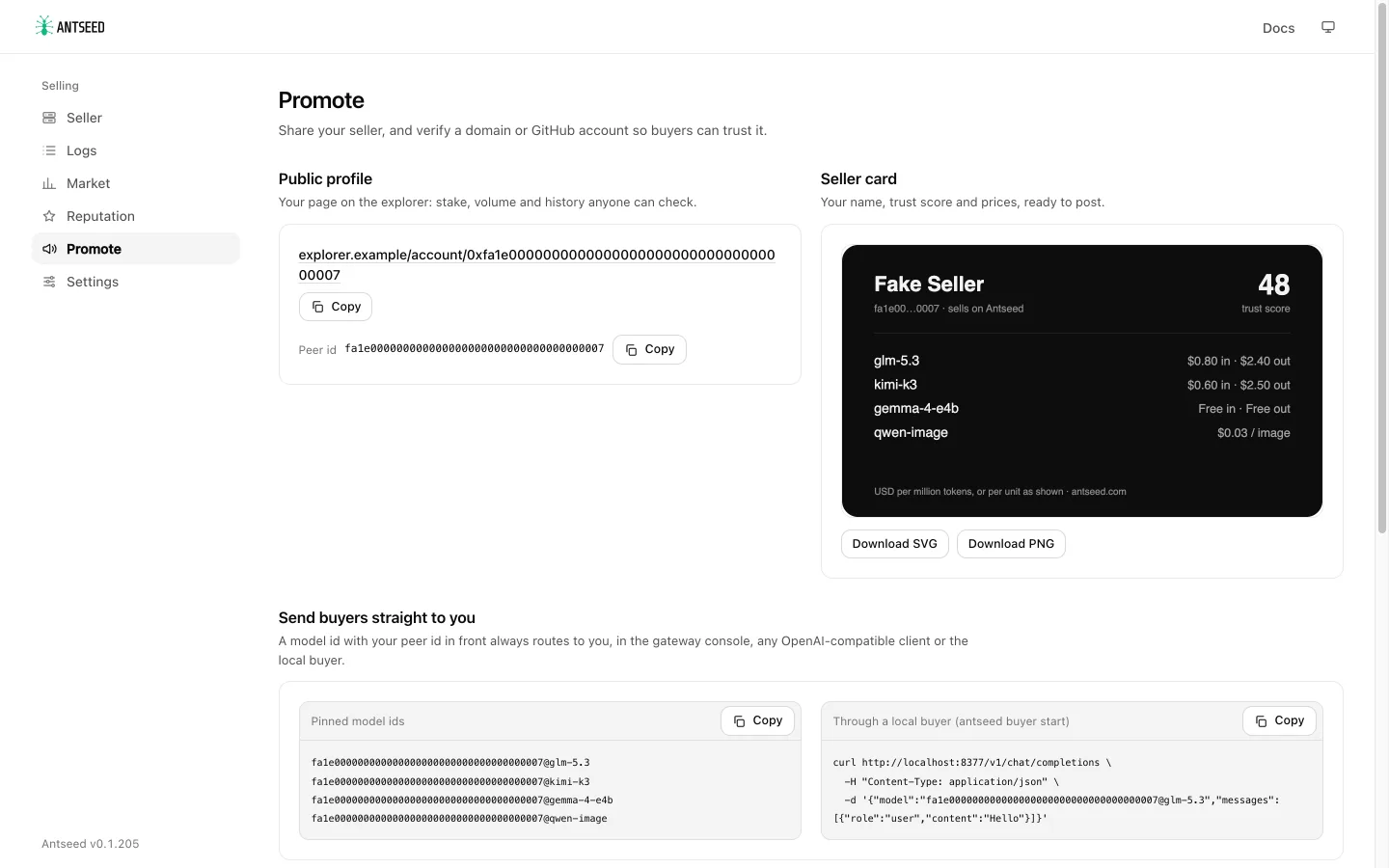
It also sets up identity verification. Add a domain or a GitHub account, save (it is written to seller.verifications in config.json), publish the proof the page shows (a DNS TXT record or a /.well-known/antseed.json file for a domain, an antseed.json file in a public repository for GitHub), then restart the seller. Check now runs the same check buyers run.
Where the numbers come from
Market and Reputation read the network as a buyer sees it. In the gateway console that is the gateway's own buyer. antseed seller dashboard uses a buyer running on the same data directory when there is one, and otherwise starts a short-lived buyer node, with its own temporary identity, that discovers the network and stops. The snapshot is reused for 15 minutes and refreshed in the background; Refresh starts a new one. The first one can take a minute. On-chain standing is read over the chain RPC in your config and reused until the staking epoch ends (at most 30 minutes).
In the gateway console
When the gateway runs on the same host as a seller, organization owners and admins see a Seller page in the console with the same view, alerts and settings included; changes made there are recorded in the gateway's audit log. The console looks for the seller in the gateway's data directory, or in ANTSEED_SELLER_DATA_DIR when the seller uses a different one. The seller's config file is the gateway's own when they share a data directory, else config.json in the seller's data directory, or ANTSEED_SELLER_CONFIG:
ANTSEED_SELLER_DATA_DIR=/var/lib/antseed-seller antseed gateway start
The page is hidden when no seller has run in that directory.
Alerts
The seller can send its events to Telegram, to a webhook, or both. Set them up in the dashboard's Alerts panel (or the console's Seller page):
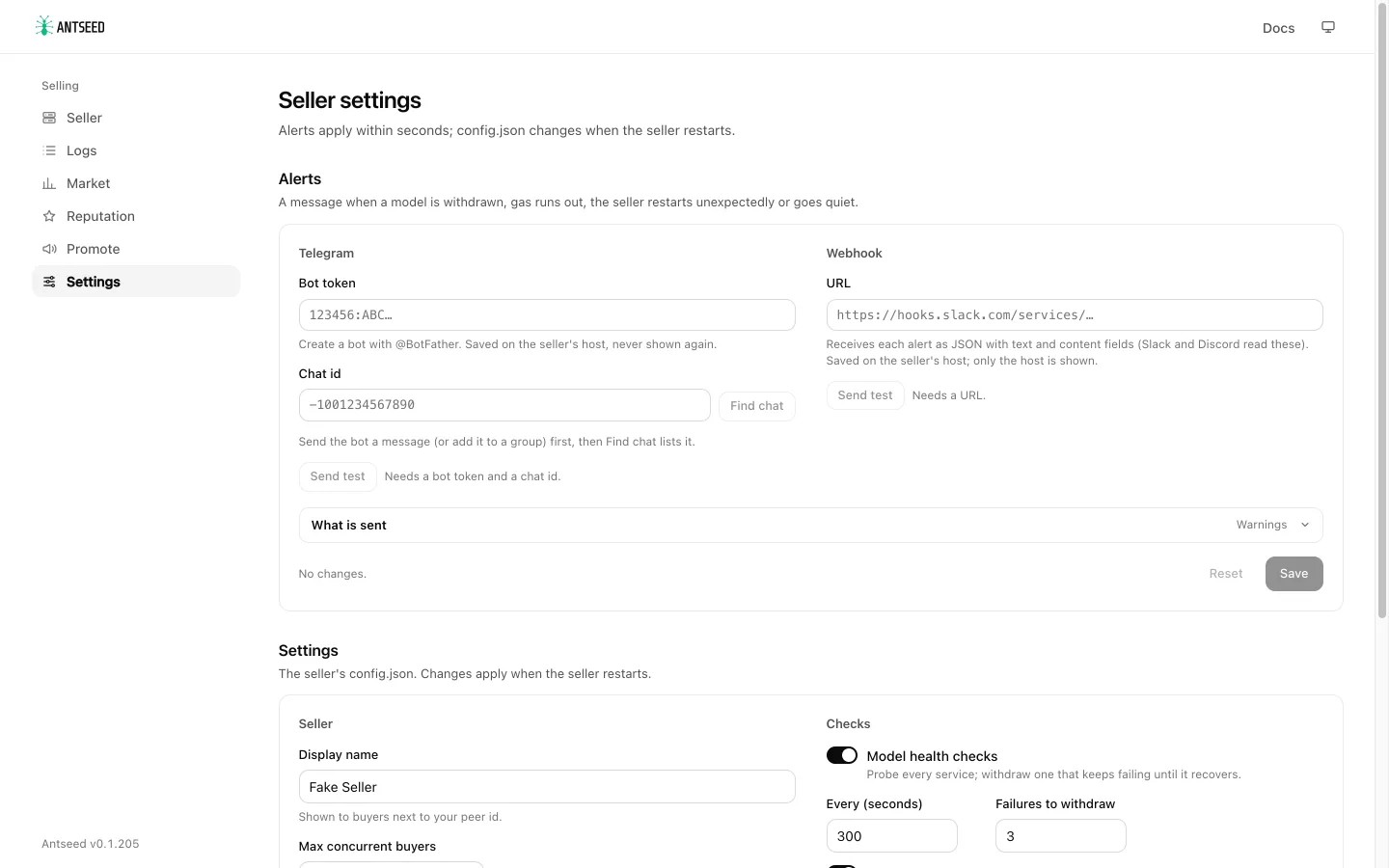
- Telegram: create a bot with @BotFather and paste its token. Send the bot a message, or add it to a group and post there, then click Find chat to pick the chat from a list (or type the chat id). Send test checks delivery.
- Webhook: the seller POSTs each event as JSON with
textandcontentfields, which Slack and Discord incoming webhooks read. - What is sent: the lowest severity to send (default: warnings), an alert when the seller has served nothing for some minutes, and the cooldown (default: 30 minutes). The cooldown is the shortest gap between two sends of the same alert, also across a recovery: a model that keeps failing and recovering alerts at most once per cooldown, and a new failure inside the cooldown is sent when it ends if it has not recovered by then. 0 sends every alert. Crash alerts keep their cooldown across restarts. A recovery is always sent after an alert that went out.
Alerts are per upstream (a provider in your config), not per model:
- Out of credit (critical): the first time an upstream answers a health check, an account check or a buyer's request with HTTP 402 or a billing error ("positive balance", "insufficient balance" or "credits",
insufficient_quota, "credit balance is too low"; a rate limit is not one), or a provider account check reports the balance at or under its minimum, one alert names it and its host and says to top it up, with the upstream's error. Its models are still withdrawn after the failed health checks, without a message for each. Another alert says when it has credit again. - Low balance (warning): for upstreams that report their balance (account checks), an alert when it drops under
lowBalanceUsd(default $5, 0 turns it off; Low upstream balance on the page,antseed seller alerts set --low-balance), and another when it is back above. - Models withdrawn: models withdrawn in one health-check round are one alert listing them, more withdrawn in a later round update it, and the recovery is one alert when all of them are back. The dashboard's events still list each model.
antseed seller start sends alerts whenever a channel is set up; with none it journals the events and says so in its startup log. Alert changes apply to the running seller within a few seconds, without a restart.
The bot token and the webhook URL (which often carries a token of its own) are secrets. They are saved on the seller's host in <data dir>/secrets/seller-alerts.json (readable only by the seller's user), never in config.json, and never shown again: the page shows only whether a token is saved and the webhook's host. A token in the environment variable seller.alerts.telegram.botTokenEnv names (default ANTSEED_ALERTS_TELEGRAM_TOKEN) takes precedence over the saved one. A token set only in the seller's environment shows as set while the seller runs; send test alerts from where the seller runs, or save the token on the page.
The other alert settings you save on the page go to <data dir>/seller-alerts.json, which overrides seller.alerts in config.json. Both files are in the data directory, so alerts can be set up even when config.json is read-only (for example mounted from a Kubernetes ConfigMap). You can also set them by hand in config.json:
{
  "seller": {
    "alerts": {
      "telegram": { "chatId": "<chat id>" },
      "idleMinutes": 60,
      "cooldownMinutes": 30,
      "lowBalanceUsd": 5,
      "minSeverity": "warning"
    }
  }
}
A value saved on the page wins over the same value in config.json. telegram.chatId can be left out of config.json (for example with only botTokenEnv there) and saved on the page or with antseed seller alerts set --telegram-chat instead.
From the command line, antseed seller alerts test sends a test to every configured channel.
Settings
The Settings panel edits the config.json fields sellers change most: display name, maximum concurrent buyers, refused countries, health and gas checks, the seller-wide free tier (limits, stakers only, and the staked tiers: the network default, your own, or none), and for each service its input, output and cached input price and its own free tier. Each pricing row shows the free tier buyers of that model get now. A model's own free tier is a free allowance on a paid model, or replaces the seller-wide free tier on a free one (see free-tier limits). It belongs to the model id, so an edit applies to every provider that offers that model, and it uses the network's staked tiers (set your own for a model in config.json). On a paid model the free allowance covers text requests, not video generation. Clearing both seller-wide limits turns the seller-wide free tier off. A save writes only the fields you changed, so an edit made elsewhere in the meantime is kept. The health check interval is at least 60 seconds. Prices shown are the ones in the file. ANTSEED_SELLER_INPUT_USD_PER_MILLION and ANTSEED_SELLER_OUTPUT_USD_PER_MILLION in the seller's environment override the provider default prices at start, so they change only services without their own price; a service with its own pricing (for example one set here) keeps it. It does not add or remove services or touch upstream keys.
Every save is checked the same way the seller checks its config at start, writes only the fields you changed (everything else stays as written), and keeps the previous file as config.json.bak. These settings apply when you restart the seller.
When config.json cannot be written, for example because it is mounted read-only from a Kubernetes ConfigMap, the Settings panel is read-only with a note (alerts stay editable). Change the file where it is managed, then restart the seller.
From the command line
Everything the dashboard shows or changes is also an antseed seller command, backed by the same code. Each takes --json.
| Dashboard | Command |
|---|---|
| Status, model health, gas, alerts | antseed seller status |
| Recent events | antseed seller events [--limit 25] |
| Requests and revenue per day | antseed seller usage [--days 14] |
| Logs | antseed seller logs [--model <id>] [--buyer <peerId>] [--since 6h] [--errors] [--cursor <next>] |
| Market | antseed seller market [--model <id>] [--refresh] |
| Reputation | antseed seller reputation [--refresh] |
| Promote, seller card | antseed seller promote [--card card.svg] |
| Identity verification | antseed seller verify [--add-domain example.com] [--add-github user[/repo]] [--remove <claim>] [--check] |
| Settings | antseed seller settings and antseed seller settings set --price glm-5.3=0.7/2.2 --max-buyers 100 … (write --price <provider>/<model>=… when two providers offer the model; without a third number the cached price stays, /none removes it). Free tier: --model-free-tier glm-5.3=100/none/24 (per address / per IP / hours, add /stakers for stakers only, =off to remove), --free-stakers-only on, --free-stake-tiers 10000:5,50000:20,200000:unlimited (ANTS locked for a year : multiplier, or default / none) |
| Alerts | antseed seller alerts, alerts set --telegram-chat <id> --idle 60 …, alerts test, alerts find-chat |
Secrets never go on the command line: pipe them in, for example printf '%s' "$TOKEN" | antseed seller alerts set --telegram-token-stdin.
Chain reads
The dashboard and the commands read the chain sparingly. Nothing is read while nobody looks: Market, Reputation and Promote load the network and on-chain standing when a page or command asks, reuse the network snapshot for 15 minutes and standing until the staking epoch ends (at most 30 minutes), and run one load at a time. Reads go through one shared provider per process that merges duplicate calls, batches concurrent calls into Multicall3, and backs off when an endpoint fails or rate-limits. Failed loads retry with growing back-off, and Refresh does nothing within 30 seconds of the last load. A running seller checks its gas balance every minute only when it is low, and every 10 minutes while it holds at least 20 times the minimum.
antseed seller status shows the chain calls per minute by source that go through the shared provider (the gas check, the dashboard and the commands; the seller's payment and channel calls use their own connection and are not counted), and antseed metrics serve exports antseed_rpc_calls_total{source,process}. Set ANTSEED_DEBUG=1 for a one-line summary every minute.
Prometheus
antseed metrics serve --role seller also exports the seller's health, for alert rules in your own stack:
| Metric | Description |
|---|---|
antseed_seller_model_advertised | 1 while a service passes health checks, 0 once it is withdrawn. Labels provider (the provider's name in your config), plugin and service. |
antseed_seller_model_consecutive_failures | Failed health checks in a row. |
antseed_seller_model_last_status_code | HTTP status of the last failed upstream check (402: upstream out of credit). |
antseed_seller_model_last_probe_timestamp_seconds | When the service was last checked. |
antseed_seller_gas_balance_eth | The seller wallet's ETH balance at the last gas check. |
antseed_seller_gas_min_balance_eth | The balance below which the seller stops advertising. |
antseed_seller_gas_depleted | 1 while advertising is paused for lack of gas. |
antseed_rpc_calls_total | Chain RPC calls by source (gas, standing, seller-network, metrics, …) and process (seller, exporter), counted as asked, before batching. |
See Metrics for the full list and exporter options.